← Back to Koby

Koby for Schools

Any book becomes a narrated, described audiobook for blind and low-vision students. In the browser, on the devices you already have, nothing to install.

Start a free pilot
Zero student PII by design

Video not loading? Watch it on YouTube.

What students get

๐ŸŽง Natural narration of any book

EPUB, PDF, Word, and comics become audiobooks with natural AI voices, with real chapters to navigate by.

๐Ÿ–ผ๏ธ Images described aloud

Illustrations, charts, and comic pages are described in place as the narration reaches them, so nothing on the page is skipped.

๐ŸŽ“ Study Mode

Comprehension questions after each chapter, answered by voice or keyboard, with spoken feedback.

๐Ÿ”” Structure cues

Gentle sounds and spoken chapter titles keep listeners oriented inside the book, a detail built for non-visual reading.

๐ŸŒ Nine languages

The interface and narration work in 9 languages, and books can be listened to in translation for language learners.

๐Ÿ’ป Runs anywhere

Chromebooks, iPads, phones, laptops. It is a web page: nothing to install, nothing for IT to package.

What teachers get

๐Ÿซ Class codes, no student accounts

Create a class code; students join as pseudonymous seats like "Reader 1", each with their own progress. No student emails, no rosters, ever.

๐Ÿ”— One-tap invite links

Share a link and the student is in. Nothing to type, memorize, or transcribe, which matters when your students read with their ears.

๐Ÿ“š Share books with the class

Pick a book from your library and it appears on every seat as a "My class" shelf. Unshare it and it disappears again.

๐Ÿ›ก๏ธ A reviewed catalog

Students see curated public-domain classics and comics that we reviewed, plus what you share. There is no open search for students.

๐ŸŽ›๏ธ Full control

Deactivate a code, revoke a seat, unshare a book, delete a class. Deleting removes the seats and the shared files with it.

๐Ÿค– Filtered AI, no analytics

On school accounts every AI feature runs with the strictest content-safety filtering, and analytics is off entirely.

See it up close

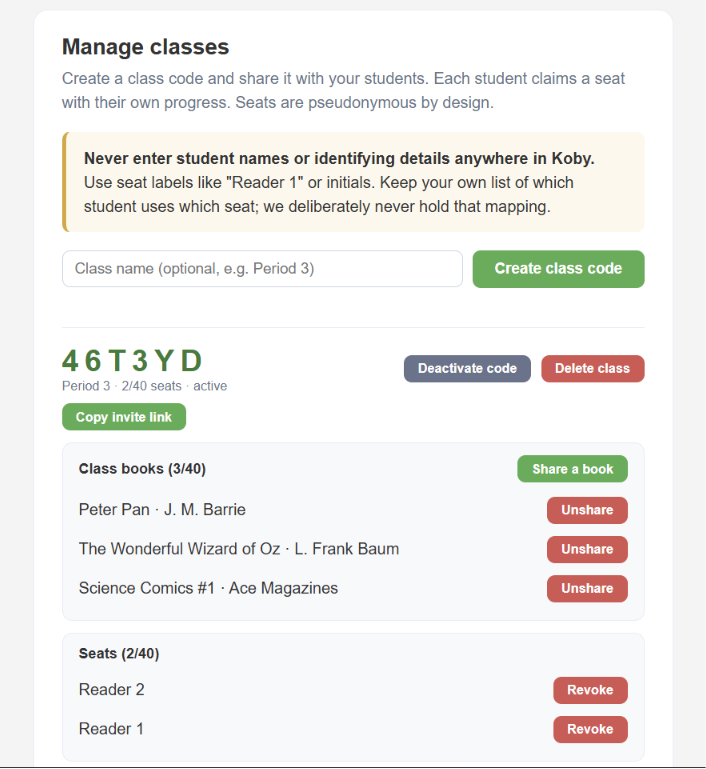
The teacher's class manager: class code 46T3YD for a class named Period 3, buttons to deactivate the code, delete the class, and copy the invite link, a Class books section listing Peter Pan, The Wonderful Wizard of Oz, and Science Comics number 1 with Unshare buttons, and a Seats section listing Reader 1 and Reader 2 with Revoke buttons.
The teacher's view: one class code, the books you shared, and pseudonymous seats. No student names anywhere, by design.
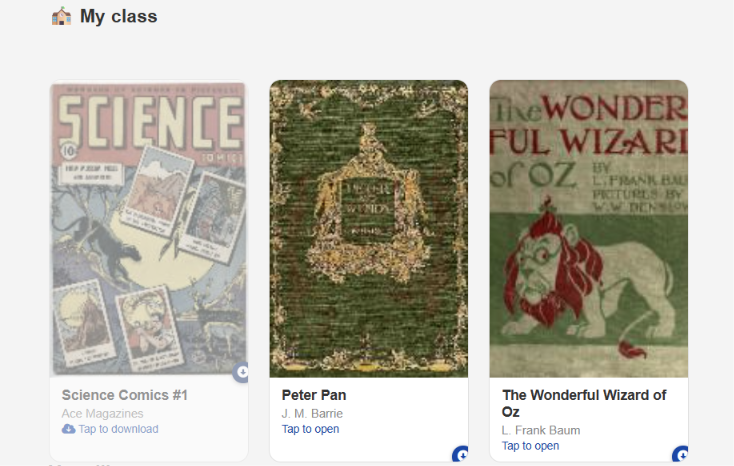
A student's home screen showing the My class shelf with three books shared by the teacher: Science Comics number 1, Peter Pan, and The Wonderful Wizard of Oz, each with its cover and a tap-to-open or tap-to-download label.
The student's view: the "My class" shelf is the first thing on their home screen. One tap and the book is in their ears.

Works with the accessible books you already have

Most institutions serving print-disabled students already hold rights-cleared, student-ready EPUBs: from Bookshare, from publishers, from licensed titles, or from your own accessible-media production. Koby acts strictly as the delivery, reading, and accessibility layer for those files. A teacher uploads the class novel as an EPUB, and Koby enriches it for every student in the class: natural narration, AI-described images and charts, chapter navigation, and Study Mode.

Comics are a separate story, and one of Koby's favorites: traditional accessible libraries carry very few of them, so Koby brings its own reviewed catalog of classic public-domain comics with every page described aloud, and it can do the same for graphic-novel EPUBs your school licenses.

Distribution rights remain fully with your institution, under provisions such as the Chafee Amendment (17 U.S.C. ยง121) in the United States and the Marrakesh Treaty internationally, or under your existing licenses. Class sharing is designed to respect that framework: shared books are visible only to the seats of that one class, the share flow states the institution's responsibility plainly every time, and deleting the class removes the files with it.

The principle: zero student PII by design

Koby never holds a student identity. We receive nothing from your school: no rosters, no student records, no integration with your student information system. School deployments are set up so that no student name, email address, or other identifier ever enters our systems.

How a school deployment works

  • Class seats separate students without identifying them. A staff member creates a class code; students join as pseudonymous seats (for example "Reader 1") with their own progress. Seat labels are chosen by the teacher, must not be student names, and we never hold the mapping between a seat and a real student. That mapping stays with the teacher.
  • Accounts belong to staff. We provision full-featured accounts for your staff members. Classes, seats, and shared books all hang off the staff account, never off a child.
  • School accounts are locked down. Analytics is disabled, every AI feature runs with the strictest content-safety filtering, students browse only a reviewed catalog plus what their teacher shares, and nothing in a school account can be made public or visible to other users. Class seats inherit every lock.

Because we receive no student education records and no student PII, this model is designed so that the vendor obligations of FERPA, COPPA, and state student-privacy laws such as New York Education Law 2-d are generally not triggered. If your institution requires a data privacy agreement regardless, we will gladly complete your process; that is normal, and we plan for it.

What data exists, and where

On the student's device

Books and files a student opens are processed in the browser. With no sign-in, they stay on the device and never reach us. A class seat stores its books and progress under the pseudonymous seat, which contains no student identity.

On a signed-in staff account

Staff sign in with an email and password that we set up for the trial. We store that email address and anything saved to the account (uploaded books, listening progress, class books shared with seats). Data is stored on Google's Firebase platform in United States data centers, encrypted in transit and at rest.

What goes to AI services, and when

  • Image and chart descriptions: the image is sent to Google's AI service to generate the spoken description. No account identifier is included in the request.
  • Cloud narration: chapter text is sent to our own server (Google Cloud Run) to generate the audio.
  • Study Mode: the reader's typed answer is sent to Google's AI service to generate feedback. It is not stored and not used to train models.

These calls use Google's paid enterprise AI APIs, under terms where content is not used to train models and is not retained beyond Google Cloud's short-term abuse monitoring. On school accounts, all of this additionally runs with the strictest available content-safety settings.

Our commitments

  • We never sell, rent, or trade data. No advertising, ever.
  • Content processed by AI features is not used to train models.
  • Analytics is off on school accounts. Nothing a student reads, types, or searches is sent to analytics for any user.
  • Everything is private by default for every Koby user. On school accounts, private is the only mode.
  • Account deletion removes all account data from our systems within 30 days (backups within 90).
  • If a data breach ever affects your institution's accounts, we will notify you within 72 hours of confirming it.
  • Subprocessors: Google (Firebase, Cloud Run, AI services) and Stripe (payments, paid accounts only). No others.

Our accessibility commitment

Koby is developed screen-reader-first (NVDA, JAWS, VoiceOver) and built to the WCAG 2.2 AA and Section 508 standards. It is made for readers who use their ears first, and that shapes decisions most apps never face:

  • Keyboard and screen-reader first. Every flow, from joining a class to answering a Study Mode question, is designed to work without a mouse and without sight.
  • No memorization, no transcription. Students join a class through a link; there are no PINs or codes to remember or retype (WCAG 2.2, Accessible Authentication, by design).
  • Sound as a first-class channel. Success and error states are audible, not just visual, and structure cues keep listeners oriented inside a book.
  • Large touch targets throughout the student flows, for low-vision students on tablets.
  • Barriers are bugs. If a student or teacher hits something a screen reader can't operate, tell us and we will treat it with the same urgency as a crash.

How a pilot starts

  1. Email us. Tell us roughly how many staff members want to try it.
  2. We create staff accounts for your team, every feature unlocked, at no cost.
  3. A teacher creates a class and shares the invite link with students.
  4. Students are listening. From email to a class of students with books in their ears, the same week you write us.
  • Nothing to install, nothing to integrate. No SIS, no LTI, no rostering, no SSO setup.
  • Free to evaluate. Pilots cost nothing. Institutional pricing is available on request when you are ready.

Questions, pilots, or a DPA to complete?

Email us: luaraiteam@gmail.com

Full policy: Privacy Policy ยท Terms of Service

Koby is built by Luarai SAS.

Last Updated: August 6, 2026